StopChomp
z Z Z

Bite less. Grow.

StopChomp watches through the camera of a spare phone or your PC's webcam and beeps when it detects nail biting or face picking. Bite your nails and Chomp copies you. Right on top of the town you're growing. Detection runs entirely on device. Your data never leaves your machine.

Download for Windows Download for Linux Google Play coming soon macOS coming soon

free 10-minute sessions · buy once · no account · one license, five computers

No. 01 · the story

Welcome to Gnashville.

A little town destined for greatness. It has a guardian Kaiju: Chomp. Very friendly, very well behaved and, unfortunately, very impressionable.

When Chomp sees you bite your nails, he copies you. Right on top of Gnashville.

Keep your hands where they belong and Gnashville thrives. Slip up and Chomp goes on a rampage, and the people of Gnashville will have to rebuild.

Every session starts with a fresh doodle town to set up on your desk and keep you company as you work. Watch as Gnashville grows from a simple campsite to a bustling metropolis (assuming you can keep Chomp in check...).

No. 02 · in action

What a session looks like.

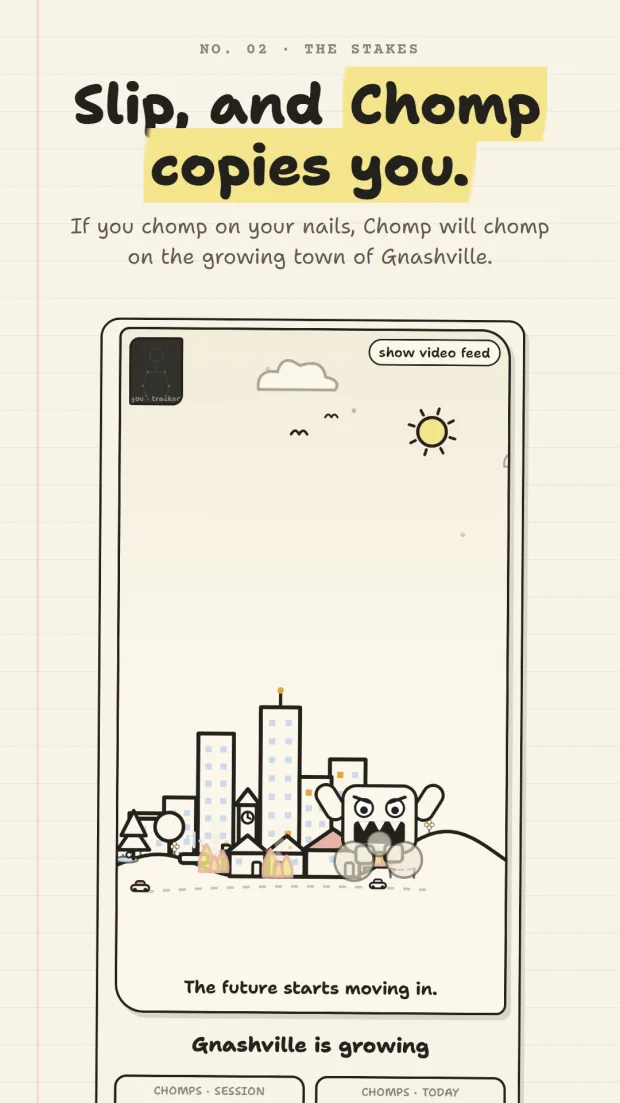
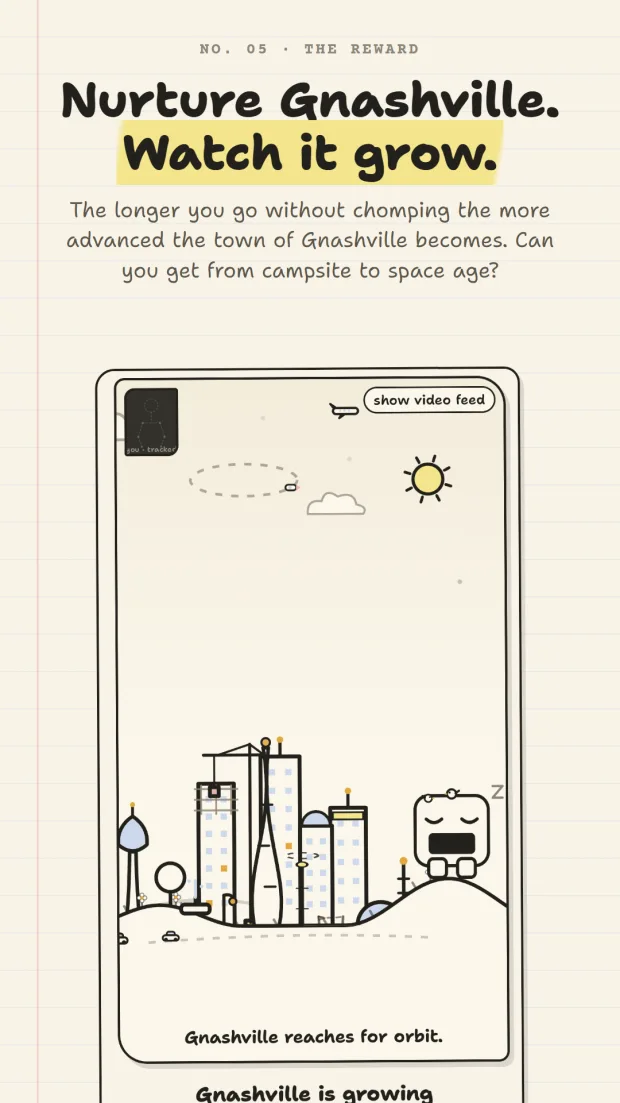
Chomp naps while you work. Bite your nails and he wrecks the place.

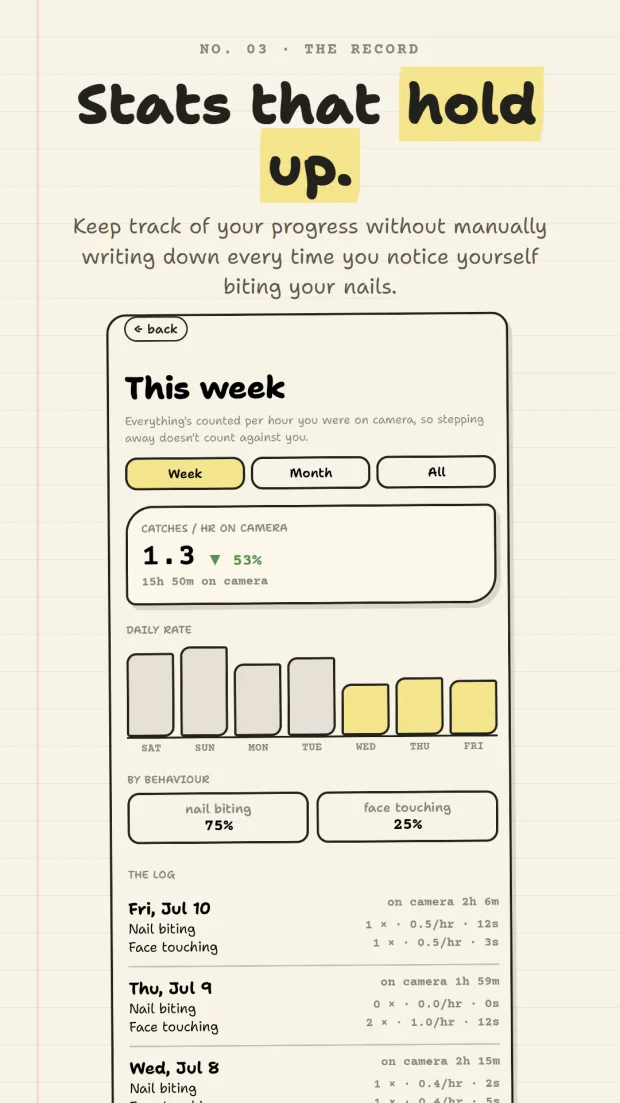
StopChomp session screen mid-rampage: Chomp stomping through Gnashville with two buildings on fire, captioned 'Slip, and Chomp copies you.' A thriving late-game Gnashville with skyscrapers and a rocket on the pad while Chomp naps, captioned 'Nurture Gnashville. Watch it grow.' StopChomp weekly stats: catches per hour on camera down 53%, daily rate bars, and a nail biting versus face touching split.

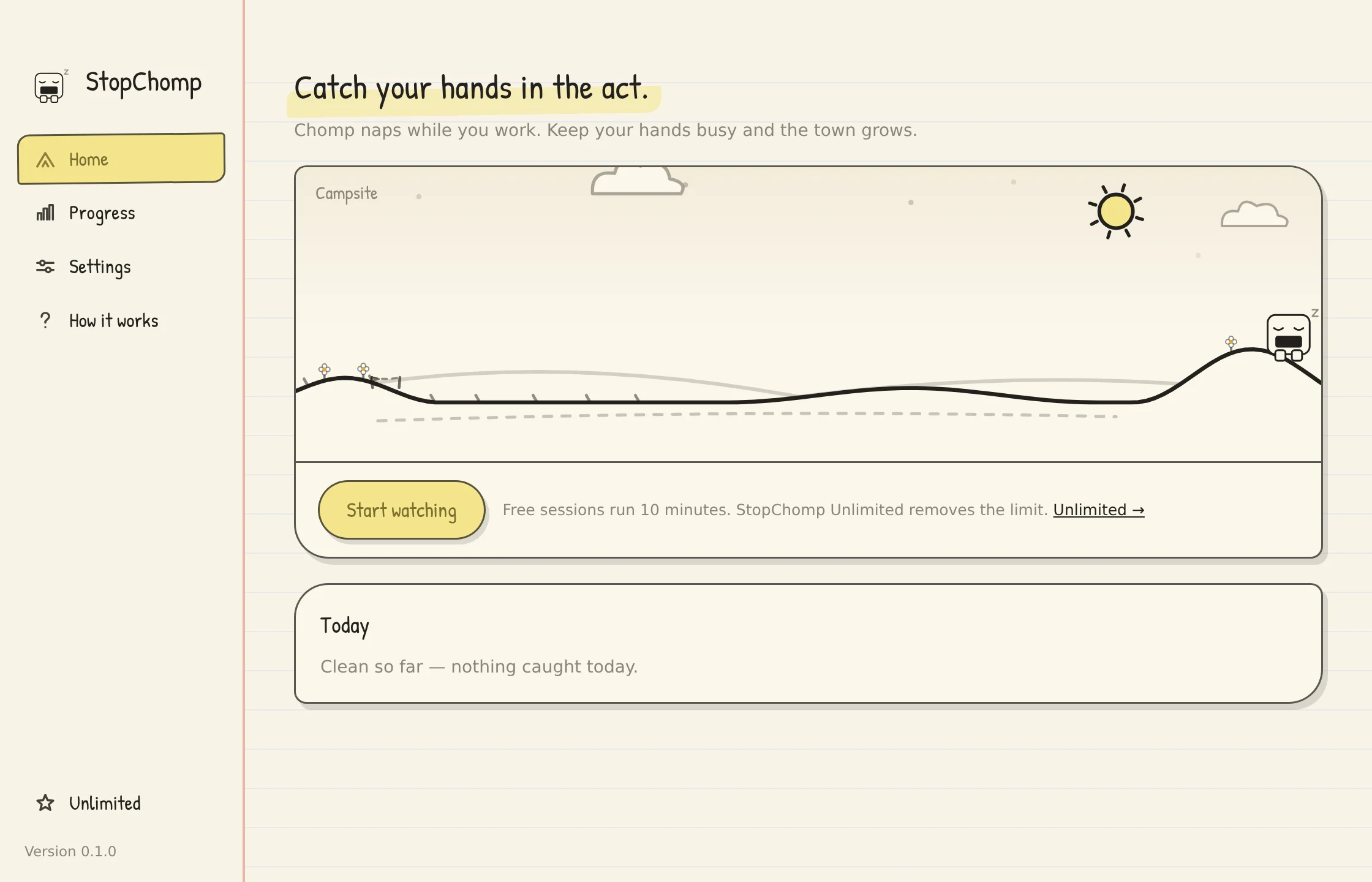
On a PC, the desktop app is the same watcher pointed at your webcam — Gnashville in a window while you work.

The StopChomp desktop app home screen: sidebar navigation, Gnashville at the campsite era with Chomp napping, and a Start watching button.
the desktop app · home
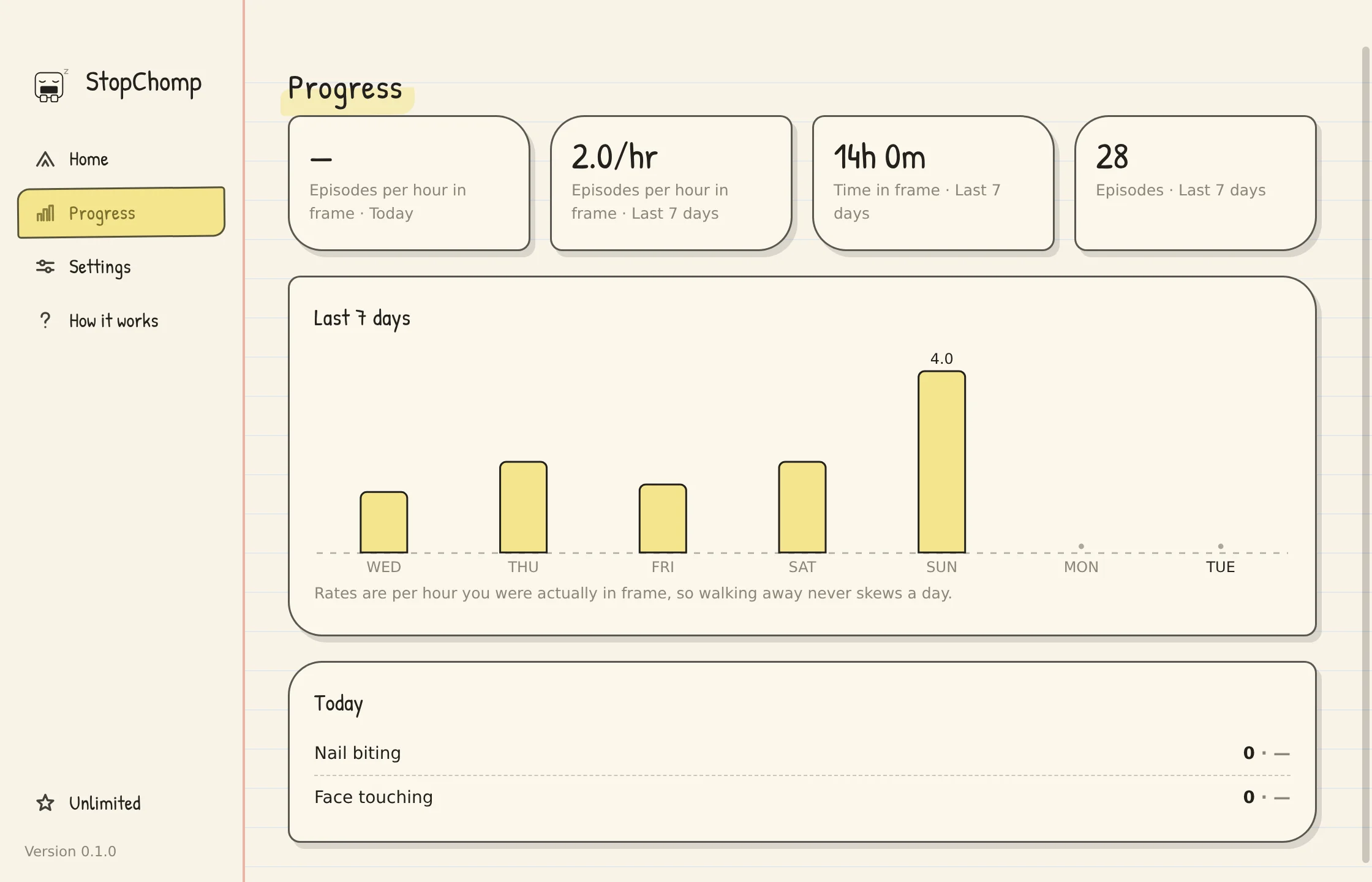
The StopChomp desktop app progress screen: episodes per hour in frame, time in frame, and a bar chart of the last 7 days.
the desktop app · a week of progress
No. 03 · the mechanics

Prop it up. Let it run.

A camera you already own

Grab a phone from the drawer and place it anywhere that has a view of your head and shoulders, or run the desktop app off your webcam. StopChomp works straight on or from a full side profile, close up or far away. No wearable, no new hardware.

A gentle beep, to remind you

StopChomp beeps or buzzes when a hand lingers at your mouth or face. The goal is to turn an unconscious habit into a conscious one. You can turn the nail biting and face touching alerts on separately and adjust the sensitivity of each, and a snooze button calls Chomp off for 15 minutes when you sit down to eat.

Stats that hold up

Stats are tracked per session and over the long term. Your stats only count the time the camera can actually see you, so stepping away from your desk won't mess up your tracking.

Made for drawer phones

StopChomp runs on 64-bit phones from around 2016 onward (Android 7.0 and up) and can keep watching with the screen off. It's designed to run efficiently on a spare phone or older device — Chomp turns any old phone or tablet into a cute desk toy and a powerful habit coach.

No. 04 · the science

Why it works.

Nail biting (onychophagia), skin picking, and cuticle biting are what clinicians call body-focused repetitive behaviors, or BFRBs. The standard treatment is habit reversal training, and it starts with awareness training: you can't stop a habit you don't notice happening. That's the part StopChomp handles for you.

Each time you hear a beep and see Chomp go on a rampage, you're developing a new habit to replace the old one and training your brain to break from its previous patterns.

No. 05 · privacy

Your camera feed stays yours.

Frames are analyzed in memory and immediately discarded. No photos or video are ever stored or sent anywhere. StopChomp works in airplane mode.

data collected: none · ads & tracking SDKs: none · account: none

Read the full privacy policy

No. 06 · the deal

Buy it once.

10-minute sessions are free, forever.

A single one-time purchase unlocks unlimited session length. No subscription, no ads, no hidden purchases, and a desktop license key covers five computers. Unlike other habit apps that rely on monthly subscriptions and want to keep you locked in, StopChomp is about getting you to stop biting your nails quickly and effectively.

checkout and license keys are handled by polar.sh · lost your key? it's always in your portal

Desktop and mobile are bought separately

The license key you buy here unlocks the desktop app — Windows and Linux — on up to five computers. It does not carry over to the Android app, and an Android purchase does not unlock the desktop app.

App stores require the mobile unlock to be sold as an in-app purchase, so it's a separate transaction: it works on any device where your app store account is signed in, and there's no license key to manage. If you want Unlimited in both places, you buy it in both places.

No. 07 · questions

Questions.

Does StopChomp record or upload video?

No. Camera frames are analyzed on your device the instant they arrive, then discarded. It even works in airplane mode.

How does it detect nail biting?

Two small vision models run on your device: one tracks your head, one tracks your hands. When a fingertip lingers at your mouth, or a hand at your face, Chomp beeps. Unlike other nail biting assistants, StopChomp is designed to work from virtually any angle.

Why is there a monster?

A number on a chart is easy to ignore. Chomp isn't. Bite your nails and he stomps Gnashville flat. Keep your hands down and it grows back.

What do I need to run it?

StopChomp is designed to be ultra lightweight and run on older devices. Any 64-bit Android phone or tablet on Android 7.0 or newer, which covers most phones from around 2016, or a Windows or Linux PC with a webcam.

Does it help with face touching and skin picking too?

Yes. Nail biting and face touching alerts switch on separately, each with its own sensitivity, so you decide exactly what Chomp reacts to.

What does it cost?

10-minute sessions are free forever. A single one-time purchase unlocks unlimited session length — no subscription, no ads, no hidden purchases. A desktop license key works on up to five computers. Mobile app store purchases are sold separately and work wherever your app store account is signed in.

Does my desktop license work on the phone app?

No — they're separate purchases. A desktop license key unlocks the Windows and Linux app on up to five computers. The Android unlock is an in-app purchase tied to your app store account, because that's what app stores require. Neither one carries over to the other.

Where do I manage my license or find my key?

In your polar.sh portal — sign in with the email you bought with. Your key is always there, along with the five activation slots, so you can free one up when you change computers. Mobile purchases have no key to manage; they restore automatically wherever your app store account is signed in.

Will it run on an old phone?

Yes, it's designed to. StopChomp uses very efficient and carefully tuned computer vision models, so it runs efficiently on a spare phone or older device. Any 64-bit phone on Android 7.0 or later works.

Who are you?

I'm a software engineer that has struggled with nail-biting for decades. I made an early version of StopChomp for myself to help break the habit and learned that it's something other people might find helpful too. I've also made several games for Amazon Alexa (including the Rim Settler RPG) and an online multiplayer competitive debate arena for Android and web (LetsArg). Thanks for taking the time to check out StopChomp!